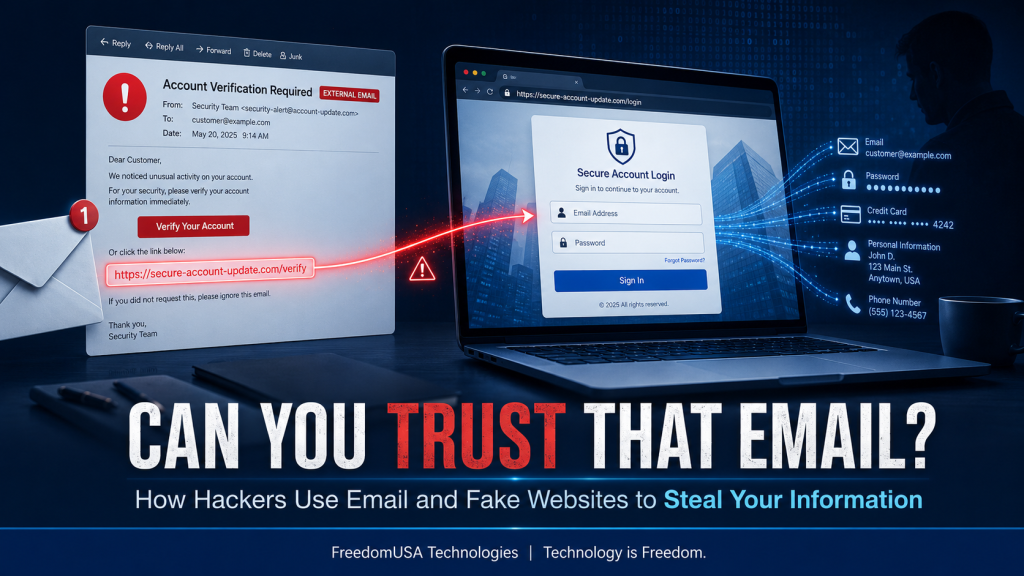
Most people imagine hackers breaking into computers by typing complicated commands. In reality, many cyberattacks begin with something much simpler: an email, a website link, or a login page that looks familiar.
Instead of attacking the technology directly, criminals often manipulate what people see. Their goal is to make someone believe they are communicating with a trusted company, coworker, bank, customer, or government agency.
These attacks are commonly called phishing, spoofing, and social engineering. Although the names sound technical, the basic idea is simple: the hacker creates something convincing enough to make you provide the information voluntarily.
It Often Begins With a Convincing Email
A fraudulent email may appear to come from:
- Your bank or credit-card company
- Microsoft, Google, Amazon, or another familiar company
- A delivery service
- Your employer or a coworker
- A customer or vendor
- A government agency
- Your website-hosting or domain provider
The message will usually create urgency. It may claim that your account has been suspended, your password has expired, a payment failed, or suspicious activity was detected.
The email then asks you to click a button or link.
The message might look professional and even contain the real company’s logo, colors, contact information, and legal notices. Unfortunately, copying the appearance of a legitimate email is relatively easy.
The Link May Not Go Where It Appears to Go
A link can display one address while sending you somewhere completely different.
For example, an email might show:
However, clicking it could take you to a fraudulent address designed to look similar to the bank’s real website.
Criminals sometimes register domain names with:
- A misspelled company name
- An extra letter or number
- A different domain ending
- A misleading subdomain
- Characters that resemble other letters
On a phone, the entire website address may not be visible. That makes it even harder to notice the difference.
The Fake Website Captures Your Information
After clicking the link, you may arrive at a website that looks almost identical to the real one. The page may ask for your:
- Email address and password
- Banking username and password
- Credit-card information
- Social Security number
- Date of birth
- Driver’s-license information
- Account verification code
- Security questions and answers
Once you enter the information, it is sent to the attacker.
The fake website may then display an error message or redirect you to the legitimate company’s website. You may assume that you typed your password incorrectly and never realize that somebody just captured it.
A Security Code Does Not Always Stop the Attack
Two-factor authentication provides valuable protection, but criminals have learned to target verification codes as well.
A fake login page may ask for your username and password first. The attacker can immediately enter that information into the legitimate website, which causes the real company to send you a security code.
The fraudulent page then asks you to enter that code. If you provide it, the attacker may be able to complete the login before the code expires.
Never provide a verification code unless you personally started the login and know exactly where the code is being used.
Website Manipulation Can Happen in Other Ways
Not every dangerous website is a completely fake copy. Hackers may also compromise a legitimate website and alter part of it.
They might:
- Add a fraudulent payment form
- Replace a business telephone number
- Change banking or payment instructions
- Redirect visitors to another website
- Install code that records information entered into forms
- Add fake downloads or software updates
- Create unauthorized administrator accounts
A customer could visit the correct website address and still encounter malicious content if the website has been compromised.
This is why businesses must protect both their internal systems and their public websites.
Business Email Accounts Are Valuable Targets
When criminals gain access to a business email account, they can study previous conversations and learn how the company operates.
They may then send realistic messages to employees, customers, or vendors. Because the message comes from a real company account and may continue an existing conversation, it can be extremely convincing.
The attacker might request:
- A wire transfer
- Updated banking information
- Payment of a fraudulent invoice
- Employee payroll information
- Copies of identification documents
- Passwords or account access
- Gift-card purchases
This type of attack is often called business email compromise. It can cause significant financial loss without using a computer virus.
Warning Signs to Watch For
Be especially careful when a message:
- Creates an unusual sense of urgency
- Threatens to close or suspend an account
- Requests a password or security code
- Contains unexpected attachments
- Requests an unusual payment
- Changes previously established payment instructions
- Uses a slightly misspelled email address or website
- Contains a link that does not match the company’s real domain
- Asks you to keep a transaction confidential
- Seems inconsistent with how the sender normally communicates
One warning sign does not always prove that a message is fraudulent, but it is a good reason to stop and verify it.
How to Protect Yourself
Do not use the link in an unexpected email to sign in to an important account. Open your browser and enter the company’s known website address yourself, or use its official application.
Before sending money or changing payment information, call the person or company using a telephone number you already know. Do not rely on the number included in the suspicious message.
You should also:
- Use a different password for every important account
- Enable two-factor authentication
- Use a reputable password manager
- Keep computers, phones, browsers, and websites updated
- Protect business email with strong security settings
- Back up important information
- Limit administrator access
- Review website and account activity regularly
- Train employees to recognize suspicious requests
Slow Down Before You Click
Hackers depend on urgency, fear, curiosity, and routine. They want you to react before you have time to examine the message.
Taking an extra minute to verify an email, website address, payment request, or security warning can prevent a costly mistake.
If something does not feel right, stop and contact the company through a trusted telephone number or website. Never be embarrassed to verify a request. Legitimate businesses will understand why you are being careful.
Protecting Your Business Starts With Understanding the Risk
Cybersecurity is not only about firewalls and antivirus software. It also involves protecting email accounts, websites, remote connections, passwords, employees, and customers.
FreedomUSA Technologies helps individuals and businesses understand their security risks and improve the protection of their technology. We explain the problems in plain language and recommend practical solutions based on how your organization operates.
To learn more or request assistance, contact FreedomUSA Technologies at 850-900-3006 or visit https://freedomusa.net.
FreedomUSA Technologies — Technology is Freedom.